SØAD Framework Components
Transaction: The Controller Layer
Transactions in SØAD act as the primary entry point for executing business logic in response to a URL request. Each transaction is mapped to a URL using a structured convention:
- Group: A logical folder that represents a module or feature set, used to organize related transactions (e.g.,
web,admin,user). - Code: The transaction identifier, which corresponds to the
.pyfile and class name (e.g.,homemaps tohome.pyandHomeclass).
For instance, the URL /t/web/home translates to:
webas the group (folder)homeas the code (Python file and class name)view()as the default method executed, unless an alternative action is specified
This pattern keeps your codebase modular and consistent, supporting better project organization as your application grows.
When a client sends a request such as /t/web/home/view, the framework handles it through the following flow:
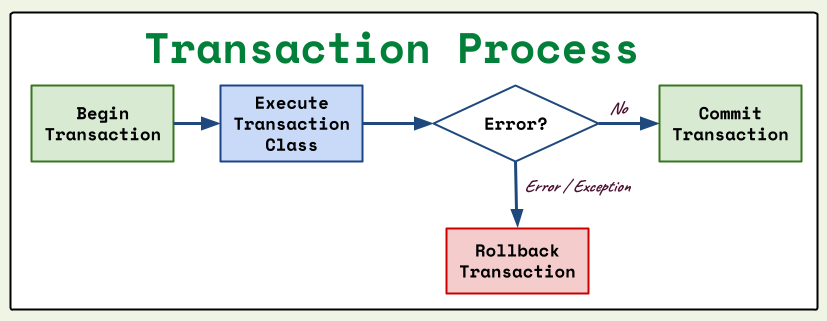
SØAD Transaction Flow
- Start a Database Transaction – The framework initiates a connection using ActiveJDBC's
Base.openTransaction(). This ensures all operations are enclosed in a database transaction. - Locate the Transaction Class – The request is mapped to a specific Jython file and class. For example,
/t/web/home/viewmaps toweb/home.py, classHome, methodview(). - Execute Transaction Logic – The defined method (
view(ctx)or any other action) is executed. - Exception Handling – If any exception is thrown during execution, the framework performs a rollback using
Base.rollbackTransaction()to ensure no partial writes corrupt the database. - Commit and Close – If execution completes without exception, changes are committed using
Base.commitTransaction()and the connection is closed withBase.close().
This transactional structure ensures data integrity and reduces boilerplate error-handling code for developers.
Finally, the transaction method defines how the response should be returned to the client. This is done by setting ctx.go_to to a render method, which determines the output format—typically an HTML view or JSON response.
Example:
URL: /t/web/home
File: web/home.py
from utils import render

class Home(Layout):
    def __init__(self):
        pass

    def view(self, ctx):
        ctx.go_to = render.as_view(ctx, "home")
This Transaction maps directly to the folder structure:
- Python file:
web/home.py - HTML template:
web/_home/home.html
Convention:
Transaction Class: Class name = code name (capitalized)Action Method: Any method in the class (e.g.,view,submit,register)Default Method:view()is called if no action is specified in URL
View (HTML) example:
<!doctype html>
<html>
<body>
    <h1>Registration Form</h1>
    <form action="/t/web/home/register" method="post">
        <input type="text" name="email" />
        <button type="submit">Register</button>
    </form>
</body>
</html>
In this example, submit button will invoke register(ctx) method in Home class.
In SØAD, all methods defined inside a Transaction class are treated as actions, which can be invoked directly through corresponding URLs.
Each action method must include the ctx parameter. The framework automatically calls the specified method and injects the current WebContext object, allowing your transaction to handle requests with full access to parameters, session, and others (e.g. HTTP Request & Response).
Transaction Folder Structure
.pyfile handles logic- Folder prefixed with
_holds the view templates - The main view file must match the transaction name
In addition to the default view, each transaction can define and render multiple views. For example, a Person transaction might have:
web/
  person.py
  _person/
    person.html     (default view for `view()`)
    add.html        (additional view to display new form)
    edit.html       (additional view to display edit form)
Each method can explicitly render its corresponding template using:
This approach makes it easy to organize multiple page variations under the same transaction and supports clean separation of logic and presentation.
Routing
SØAD routes every request through a clean, convention-based URL structure to the Transaction:
/t— transaction prefix{group}— folder/module name{code}— transaction file/class{action}— method inside the class; defaults toview
Example URL Mapping:
/t/base/login→ callsLogin.view()/t/web/home/register→ callsHome.register()/t/app/user/edit?user_id=5→ callsUser.edit()with query param
Context Path
In Java Servlet architecture, the context path refers to the root path of a deployed web application. It is the prefix added to all URLs served by the application.
In SØAD Framework, the context path can be retrieved within a transaction using:
By default, SØAD assumes the context path is an empty string ("") when running as a standalone application. However, if the application is deployed with a context (for example, under /myapp), then this value will reflect that path.
Example:
Given a deployed application URL:
- Context Path:
/myapp - Transaction URL:
/t/web/welcome
This context path is useful when constructing links or redirecting within views and templates to ensure consistency across environments.
View
Each transaction ends by setting ctx.go_to to a function that define the response. The most common output is an HTML page rendered using the render.as_view() function:
This will render the home.html view inside the _home folder.
Note
The ctx.go_to parameter can accept either a string or a function. When a string is provided, it is treated as a URL path, and the framework redirects the user to that URL using response.sendRedirect(). If a function is provided, it is executed, and its output is returned to the user. The function is responsible for processing the response, including setting the content type, status code, and writing the response body to the HttpServletResponse object.
View Files
Views in SØAD are typically HTML files enhanced with Handlebars syntax. Handlebars allows dynamic content rendering by using placeholders and control logic directly within the HTML.
You can:
- Insert variables:
{{user_name}} - Perform loops:
{{#each items}}...{{/each}} - Add conditions:
{{#if isAdmin}}...{{else}}...{{/if}} - Use helpers: such as
select,dateFmt, orref_lookup
This makes the HTML highly flexible and data-driven while remaining clean and readable.
Output Render Methods
SØAD provides multiple output render methods through utils.render:
render.as_view(ctx, view)- Render Handlebars HTMLrender.as_json(ctx, obj)- Render JSONrender.as_html(ctx, code)- Raw HTMLrender.as_string(ctx, text)- Plain stringrender.as_file(ctx, file)- File downloadrender.as_blob(ctx, blob)- Binary datarender.as_pdf(ctx, view)- PDF output
You can find examples of how to use these render functions in the Code Library section of this documentation.
handlebars helpers
Handlebars supports built-in helpers and custom helpers for advanced functionality. You can use these helpers to manipulate data, format output, and control rendering logic directly within your templates.
Built-in helpers:
if,else,unless,each,and,or,not,eq
Custom helpers:
ref_lookupselect,optiondateFmtinhtmlsessionget
You can find more details about these helpers in the Utilities chapter of this documentation.
Model
In SØAD Framework, Model classes are automatically generated from the database tables using ActiveJDBC. Once generated, these classes are automatically instrumented.
Instrumentation in ActiveJDBC refers to the process of enhancing the compiled Java Model classes so they are ActiveJDBC-aware. This means they gain access to methods such as saveIt(), findAll(), first(), where(), and many others provided by the ActiveJDBC framework.
SØAD handles this behind the scenes. At runtime, after introspecting the database schema and generating the Model classes, the framework runs ActiveJDBC’s instrumentation process to inject the necessary metadata and behaviors. This allows you to interact with your database tables as if they were regular Java classes, making CRUD operations straightforward and intuitive.
Given a person table:
Usage in Transaction:
from models import Person

class Home(Layout):
    def view(self, ctx):
        persons = Person.findAll()
        ctx.output["all_person"] = persons
        ctx.go_to = render.as_view(ctx, "home")
Example: Hello World
Folder structure:
hello.py
from utils import render

class Hello(Layout):
    def view(self, ctx):
        ctx.go_to = render.as_view(ctx, "hello")
_hello/hello.html