SØAD Directory Structure
This chapter outlines the structure of a typical SØAD project directory. Understanding this layout helps developers know where to place configuration files, transactions, views, and libraries.
app
├── conf
│   ├── log4j2.properties
│   └── sufia.properties
├── console.log
├── lib
├── logs
├── s0adm
├── server
├── shutdown.sh
├── startup.sh
└── webapp
    ├── assets
    ├── index.html
    └── WEB-INF
        ├── classes
        │   └── models
        ├── jython
        └── lib
Directory Overview
/app/
The root directory of the application.
- conf/ – Contains configuration files.
log4j2.properties– Logging configuration.sufia.properties– Core framework properties and application-level settings.
- console.log – Main log file capturing console output from the server.
- lib/ – Folder for core libraries.
- logs/ – Folder for log archives.
- s0adm/ – SØAD IDE.
- server/ – Server runtime files.
- startup.sh / shutdown.sh – Scripts to start or stop the application.
/app/webapp/
This is the main web application folder (similar to webapps/ROOT in traditional servlet apps).
- assets/ – Static assets like CSS, JS, fonts, images, etc.
- index.html – Optional landing page or placeholder HTML.
- WEB-INF/ – Protected folder not directly accessible via URL. Contains:
- classes/ – Compiled Java classes and generated model classes.
- models/ – ActiveJDBC model classes automatically generated.
- jython/ – The location for your Jython transaction files and packages.
- lib/ – Additional JAR files required by the app (internal classpath).
- classes/ – Compiled Java classes and generated model classes.
This structure allows SØAD applications to be easily managed, containerized, or deployed with minimal setup. Transactions are typically placed under /webapp/WEB-INF/jython, and views under /webapp/WEB-INF/jython/_group folders.
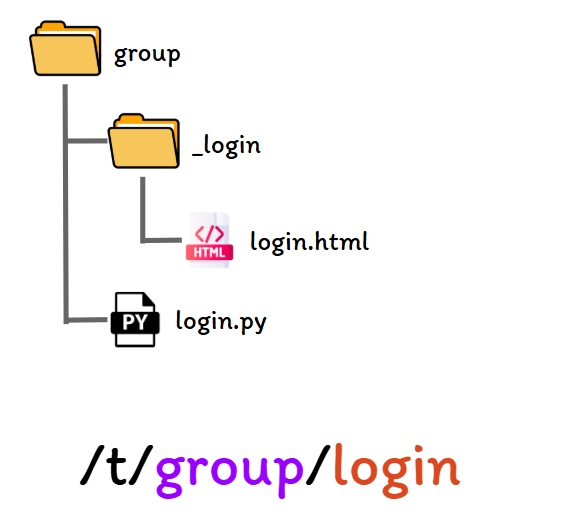
Transaction File Structure
The directory structure for transaction files is organized as follows:
- The parent directory represents a group, containing transaction files with a .py extension.
- Each transaction file has a corresponding subdirectory named identically to the transaction file.
- This subdirectory contains views associated with the transaction, with the default view being an .html file named the same as the transaction file.